
Running Pi-hole DNS with Docker Compose on a Raspberry Pi 5
I deployed Pi-hole inside a Docker Compose stack on my Raspberry Pi 5 to create a local, network-wide DNS filtering and ad-blocking solution. This lightweight setup turned the Pi into a self-hosted DNS server that improves speed, privacy, and control over every device on my network. Using Docker Compose keeps the configuration portable and easy to update — I can add or remove containers, apply blacklist/whitelist changes, and back up settings with a single command. This project taught me about containerized networking, DNS resolution flow, and persistent data management on ARM-based hardware. It also integrates perfectly with my Proxmox lab, letting me route all VM traffic through Pi-hole for clean, ad-free testing and better visibility into local DNS queries.
Chris Jedrasik
1 min read
Project Update: Pi-hole DNS with Docker Compose on a Raspberry Pi 5
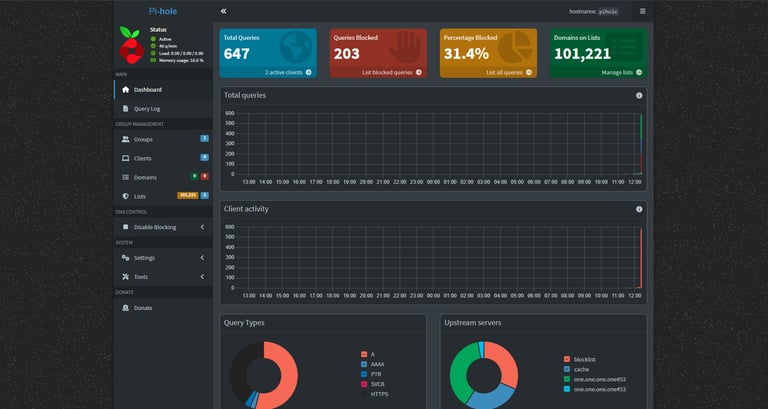
I set up Pi-hole inside a Docker Compose stack on my Raspberry Pi 5 to create a network-wide DNS filtering and ad-blocking solution. The goal was to offload DNS duties from my main Proxmox server and build a fast, lightweight, and self-contained DNS system.
Running on Raspberry Pi OS Lite with Docker and Docker Compose, Pi-hole acts as a local DNS sinkhole—blocking ads, trackers, and malicious domains before they reach any device on my network. My Compose setup includes persistent volumes for configuration and logs, meaning I can update or restart containers without losing data.
This setup gave me hands-on experience with container networking, DNS hierarchy, and service persistence. I learned how to redirect all network traffic through the Pi-hole IP address via my router, monitor live DNS queries, and fine-tune blacklists and whitelists to balance privacy and usability. It also taught me security basics—restricting admin access, locking down SSH, and managing Docker networks safely.
The Pi-hole now integrates seamlessly with my Proxmox lab, filtering DNS for all my VMs and physical devices. It’s fast, efficient, and transparent—improving network performance while giving me complete visibility into domain requests.
In short, this project turned my Raspberry Pi 5 into a central piece of my home infrastructure. Running Pi-hole in Docker Compose made it easy to maintain, update, and experiment with, while reinforcing my understanding of networking, containerization, and real-world IT administration—all on a $90 device.
© 2025 Christopher Jedrasik. All rights reserved.
Directory
Let's Connect!
Built with curiosity and user experience in mind.