
Setting Up Windows Server 2022 in My Proxmox Home Lab
I installed and configured Windows Server 2022 (Desktop Experience) inside my Proxmox virtualization environment to simulate a real enterprise network. This project let me explore Active Directory, DNS, DHCP, and Group Policy in a fully contained lab, giving me hands-on experience with core Windows Server administration tasks. Combined with my other VMs — Ubuntu Server, Kali Linux, and Windows 11 Pro — this setup became my all-in-one environment for learning IT infrastructure, automation, and system security from the ground up.
Chris Jedrasik
1 min read
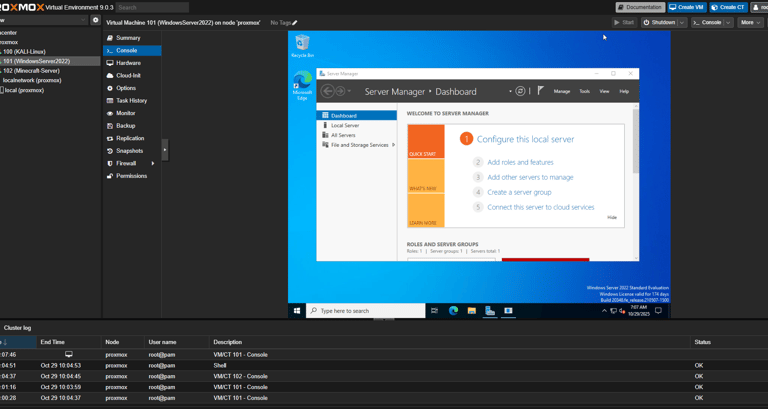
Project Update: Windows Server 2022 in My Proxmox Lab
After setting up my Proxmox VE home lab, I deployed Windows Server 2022 (Desktop Experience) as one of my core virtual machines. This setup lets me explore real enterprise-grade environments without needing physical servers or licenses beyond my local network.
Inside this lab, I’ve been learning to:
Configure Active Directory with domain controllers, users, and organizational units.
Manage DNS and DHCP roles to control local network traffic and dynamic IP assignments.
Test Group Policy Objects (GPOs) to enforce settings across connected Windows clients.
Simulate small business network topologies for real-world IT troubleshooting practice.
Because Proxmox isolates and snapshots each VM, I can break, test, and rebuild systems freely — gaining practical experience without consequence. I’ve even started integrating PowerShell automation to deploy users, backup configurations, and manage updates at scale.
This Windows Server environment pairs perfectly with my other VMs — Ubuntu Server for backend services, Kali Linux for security testing, and Windows 11 Pro for client-side testing — forming a complete, hands-on IT ecosystem.
In short, this lab is my personal training ground. It mirrors the infrastructure used in professional IT environments and gives me a space to practice Active Directory, network administration, automation, and system recovery — all from home, on my own hardware.
© 2025 Christopher Jedrasik. All rights reserved.
Directory
Let's Connect!
Built with curiosity and user experience in mind.